UX WRITING | CONTENT DESIGN
Scope: Write new UX copy
Tools: Figma, Google Docs
Overview
Okta released a new feature that allows admins to configure an email service provider of their choice. Previously Okta was the only email service provider. With the new feature, admins can add their own email provider. They can configure both Okta and the custom provider, and they must configure at least one.
This feature introduces the following steps to the configuration:
- Add the custom email domain
- Configure the email provider. This step includes two options:
- Use Okta as the provider
- Add an external email service provider
Challenge
The Step 2 needed detailed instructions in the UI because of the following reasons:
- If the admin wants to use Okta as an email provider, they need to update their DNS records to point to Okta. The admin signs in to their registrar or DNS provider, and adds the DNS entries provided by Okta. These entries were provided in the UI.
- It takes a few minutes for the DNS changes to be available globally. We needed to inform admins about this delay.
- After the DNS records are updated, the admin needs to return to Okta to verify the configuration.
- If using their own email provider, the admin needs to go to another page in the Admin Console to configure it. Then they come back to the original page to verify the configuration.
Solution
First, I ensured the steps were informative and actionable:
- Add email domain
- Configure email provider
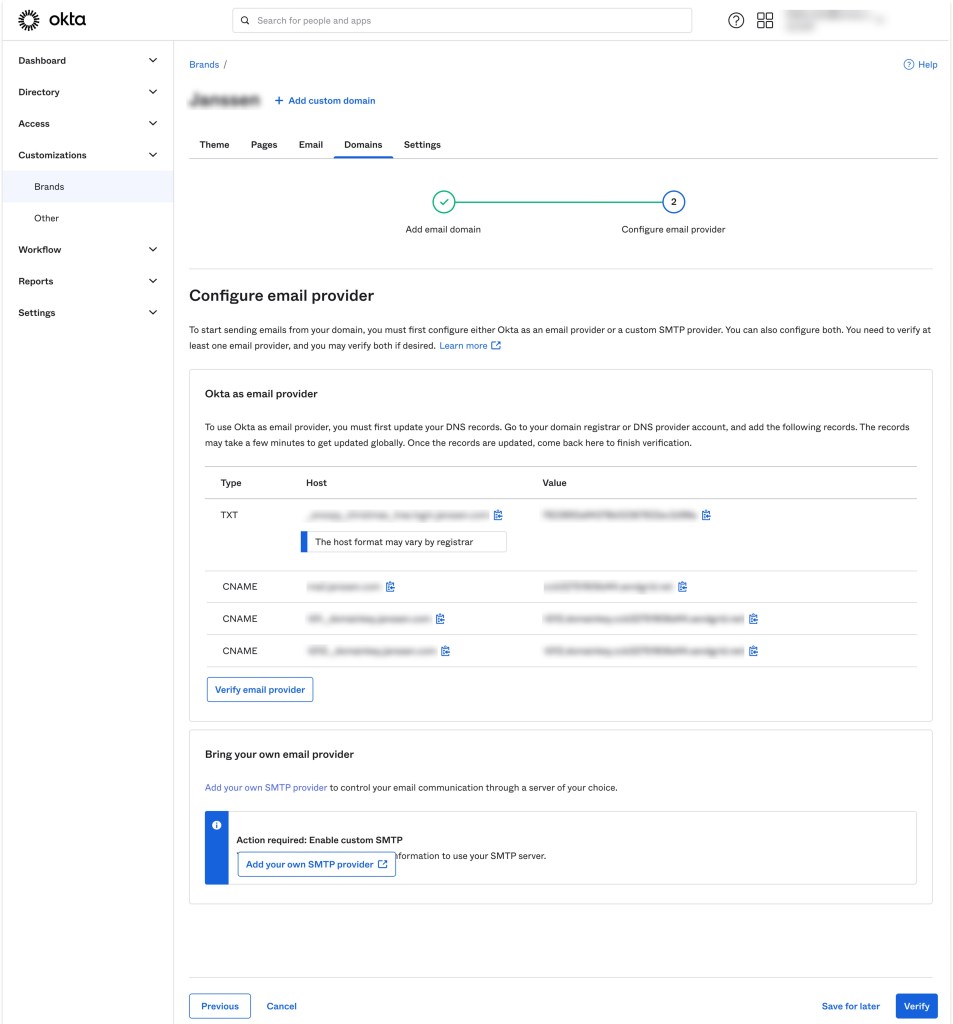
Then, I organized the Step 2 page into two sections with clear headings to inform admins about the two options:
- Use Okta as email provider
- Bring your own email provider
I also added an explanatory paragraph at the beginning detailing what admins need to do on this page and what their options are.
This is the copy:
To start sending emails from your domain, you must first configure either Okta as an email provider or a custom SMTP provider. You can also configure both. You need to verify at least one email provider, and you may verify both if desired.
Here, I used the phrase Okta as an email provider because customers mainly configure Okta as an Identity Provider. Therefore, it was important to make that distinction. I also added that they could configure and verify both options in case admins wanted to use one option as a backup.
Then, in the Okta section, I provided succinct yet complete instructions about how to update DNS records to use Okta as an email provider.
This is the copy:
To use Okta as an email provider, you must first update your DNS records. Go to your domain registrar or DNS provider account, and add the following records. The records may take a few minutes to get updated globally. Once the records are updated, come back here to finish verification.
The second section, Configure your own email provider, was brief, with a link that takes the admin to the right page:
Add your own SMTP provider to control your email communication through a server of your choice.
Copy
 Nikita Apraj