SINGLE SOURCING | CONTENT MODELING
Okta offers 14 authenticators that IT administrators can configure for their enterprise to make the sign-in process secure. For example, Google Authenticator, Duo Security, phone (SMS and voice call), and email. These authenticators are prompted to the user for 2FA/MFA when they sign in to their company account.
The configuration docs explain how to set up each authenticator. These are some of the most visited topics on the help website.
Challenge
These docs were originally created over a long period of time. Many writers worked on them, adding new features into the existing documentation. These updates were stand-alone rather than comprehensive user experience enhancement. This was resulting in a negative impact:
- Information provided in the docs wasn’t consistent and sometimes incomplete.
- Similar content was added in multiple versions in the docs, adding to the translation costs.
- Docs were not single-sourced, resulting in unnecessary content duplication.
- Duplicate and inconsistent content also made the doc maintenance time-consuming and error-prone because authors would have to manually update every occurrence.
Process
1. Scoping the project
Before starting the work, I created a scoping document to determine:
- Issues we wanted to address: Inconsistency, incomplete information, lack of single-sourcing
- End results: Complete docs that are single-sourced and consistent
- What’s in scope and what’s not: Children topics for authenticators were out of scope.
2. Project planning
Once the scope was agreed upon, I created a 2-phase project plan:
A. Create a template using standardized language and reusable snippets
- Do content analysis to determine missing information, existing patterns, common content that can be single-sourced, content unique to each authenticator.
- Design the new template to reuse the common content while leaving room for adding authenticator-specific content.
B. Update all the authenticator configuration docs using the new template
This phase involved rewriting the 14 topics to conform with the new reusable template.
3. Project implementation
Designing the new template
Based on the research done in the previous stages, I designed a new template in MadCap Flare, leveraging its snippets functionality.
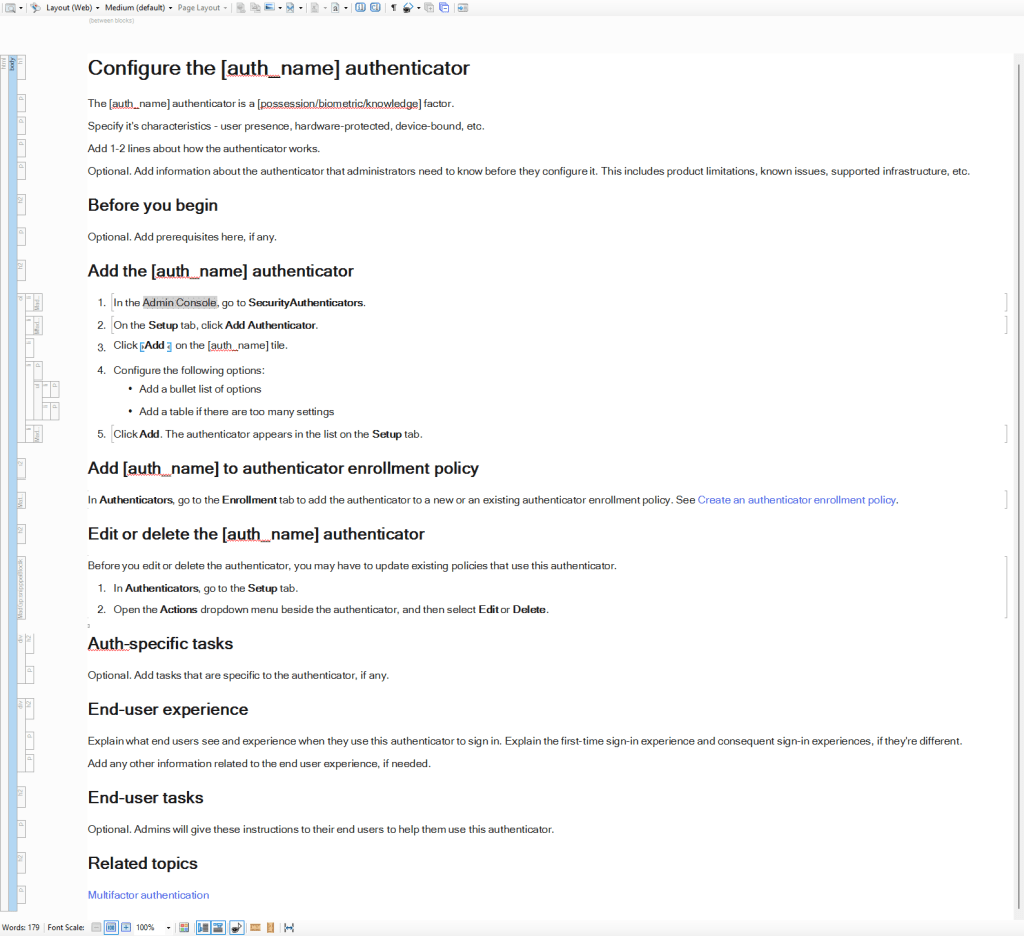
I included the following sections and information in the new template:
Introduction
Each MFA method (authenticator) has a factor type. It could be possession-based, biometric, or knowledge-based. It also has certain characteristics. It could verify user presence. It could be device-bound, hardware-protected, user-verifying, or phishing-resistant.
Okta recommends IT administrators implement multiple MFA methods spanning different factor types and characteristics for wider security. However, the configuration docs didn’t mention this information, making it difficult for admins to determine whether a particular authenticator fulfilled their requirements. I added this information in the introduction for each authenticator topic so admins could decide right away whether they want to configure this method.
It’s followed by a short description about how the authenticator works. The introduction also has a placeholder to include any additional information about the authenticator that admins need to know before starting the configuration. This includes any product features that might be not supported in certain infrastructure, known issues, etc.
Before you begin
This section includes prerequisites. Many authenticators require certain setups. For example, to use an identity provider (IdP) as an authenticator, administrators first must configure a SAML or OIDC IdP. This information is included in this section.
Configuration tasks
All authenticators include the following common tasks:
- Add the authenticator
- Add the authenticator to the enrollment policy
- Edit and delete the authenticator
I created snippets for the steps involved in task 1 and for tasks 2 and 3.
This part also accommodates authenticator-specific tasks, which can be added after the three common tasks above.
End-user experience
All authenticators are ultimately used by the employees, students, contractors in the IT admin’s organization. Therefore, I added a section to explain how an authenticator appears to these end users and how they interact with it.
The section includes user experience during two scenarios: first sign in and subsequent sign in.
This section can also include other information specific to the authenticator. For example, downloading the Authenticator app for using Google Authenticator.
End-user tasks
This is an optional section. Some authenticators can involve additional tasks or functionality for end users. Those tasks are added here. Administrators can share this information with their users. For example, enrolling multiple Smart Cards.
Related topics
This section includes a link (added as an XREF) to the multifactor authentication homepage. This allows administrators to go back to the main MFA page to find information about other authenticators.
Rewriting the docs
Once the template was approved, we rewrote the authenticator topics to follow the new content model. The original topics were already published on the website, so I worked in GitHub branches to make my changes. The writing process involved writing the draft, getting it reviewed and approved by the SMEs, getting it approved by the editor, and publishing.
The docs are published here: Multifactor authentication.
 Nikita Apraj